行確認ボタン・行追加ボタンクリック処理
フォームクラスに、選択明細行確認ボタンクリック処理と明細行追加ボタンクリック処理を実装します。
サンプルプログラム
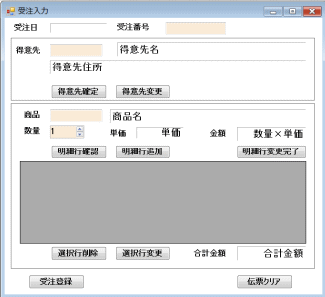
【明細行確認ボタンクリック処理】
- 商品コードを引数に指定して、商品クラスのインスタンスを生成
- 商品名称プロパティと、単価プロパティから、商品名称と単価を取得
- 受注金額は、単価×数量を計算し、表示形式を指定
【明細行追加ボタンクリック処理】
- ClsInsertDetailRowクラスの共有メソッドCreateDataRowを呼び出して、受注ディテール表の1行分を生成
- この受注ディテール表行に商品コードと受注数量をセット
- この行データを引数に指定して、ClsInsertDetailRowクラスのインスタンスを生成
- バインディングソースに追加(受注明細リストにも追加される)
    '*******************************************************
    ' 明細行確認ボタンクリック処理
    '*******************************************************
    Private Sub BtnGyoKakunin_Click _
        (ByVal sender As System.Object, _
        ByVal e As System.EventArgs) Handles BtnGyoKakunin.Click

        Try
            ' 商品クラスのインスタンス生成
            Dim shohin As New ClsShohin(TxtShohinCode.Text)
            ' 商品名称と単価を取得し、ラベルにセット
            LblShohinMeisho.Text = shohin.ShohinMeisho
            LblJuchuTanka.Text = CStr(shohin.Tanka)
            ' 金額を計算後、表示形式を指定し、ラベルにセット
            LblJuchuKingaku.Text = _
                (NudSuryo.Value * shohin.Tanka).ToString("#,##0")
            ' 明細行追加ボタンにフォーカス
            BtnGyoTsuika.Focus()
        Catch ex As ShohinCodeException
            ' 商品コードエラー処理
            MessageBox.Show(ex.Message, "商品コードエラー")
        Catch ex As DBIOException
             MessageBox.Show(ex.ToString, "DBIO例外発生")
        Catch ex As Exception
            MessageBox.Show(ex.ToString, "その他例外発生")
        End Try

    End Sub

    '*******************************************************
    ' 明細行追加ボタンクリック処理
    '*******************************************************
    Private Sub BtnGyoTsuika_Click _
        (ByVal sender As System.Object, _
        ByVal e As System.EventArgs) Handles BtnGyoTsuika.Click

        Try
            ' 受注明細1行生成
            Dim dr As DataRow
            dr = ClsInsertDetailRow.CreateDataRow
            ' 入力データセット
            dr("商品コード") = TxtShohinCode.Text
            dr("受注数量") = NudSuryo.Value
            ' 受注明細1行を受注明細リストに追加
            Dim meisaiGyo As New ClsInsertDetailRow(dr)
            bindingSrc.Add(meisaiGyo)
            ' 受注合計金額を計算
            Dim sum As Integer = 0
            For i As Integer = 0 To meisaiList.Count - 1
                sum += meisaiList(i).JuchuKingaku
            Next
            LblGokeiKingaku.Text = sum.ToString("#,##0")
            ' 明細行クリア
            TxtShohinCode.Text = Nothing
            LblShohinMeisho.Text = Nothing
            NudSuryo.Value = 1
            LblJuchuTanka.Text = Nothing
            LblJuchuKingaku.Text = Nothing
            ' 商品コードにフォーカス
            TxtShohinCode.Focus()
            ' 明細行削除ボタン押下可能
            BtnGyoSakujo.Enabled = True
            ' 明細行変更ボタン押下可能
            BtnGyoHenko.Enabled = True
        Catch ex As ShohinCodeException
            ' 商品コードエラー処理
            MessageBox.Show(ex.Message, "商品コードエラー")
        Catch ex As DBIOException
             MessageBox.Show(ex.ToString, "DBIO例外発生")
        Catch ex As Exception
            MessageBox.Show(ex.ToString, "その他例外発生")
        End Try

    End Sub